DNS Lookups
The purpose of the DNS rule is to control, monitor or restrict any protected application from performing DNS lookups on specifically configured hosts.
Overview
A use case of a DNS Lookup would be creating a rule to prevent a specific protected application from looking up any hostnames for any domains that are not known or trusted and defined in a rule by the Application Security Administrator. If a protected application can be utilized by malware to send data via DNS requests (thus using DNS to act as a covert Command and Control channel or a path for data exfiltration, especially low and slow exfiltration) it can bypass many firewall configurations. However, if the application is protected by RASP Java Agent, it can have its DNS requests limited by the RASP Java Agent, thereby preventing it from communicating out to a malicious external server endpoint.
Attention: If this rule is not configured with the proper forethought, it can drastically affect other rules. For example, certain socket rule types can use DNS names in the rules. If a DNS name is used in a rule, and that rules' DNS lookup fails, then the rule will be discarded for that trigger of the rule. If this DNS rule somehow prevents Agent-protected machines or applications from performing DNS lookups, then it could result in the unintentional consequence of causing the socket rules to fail as well.
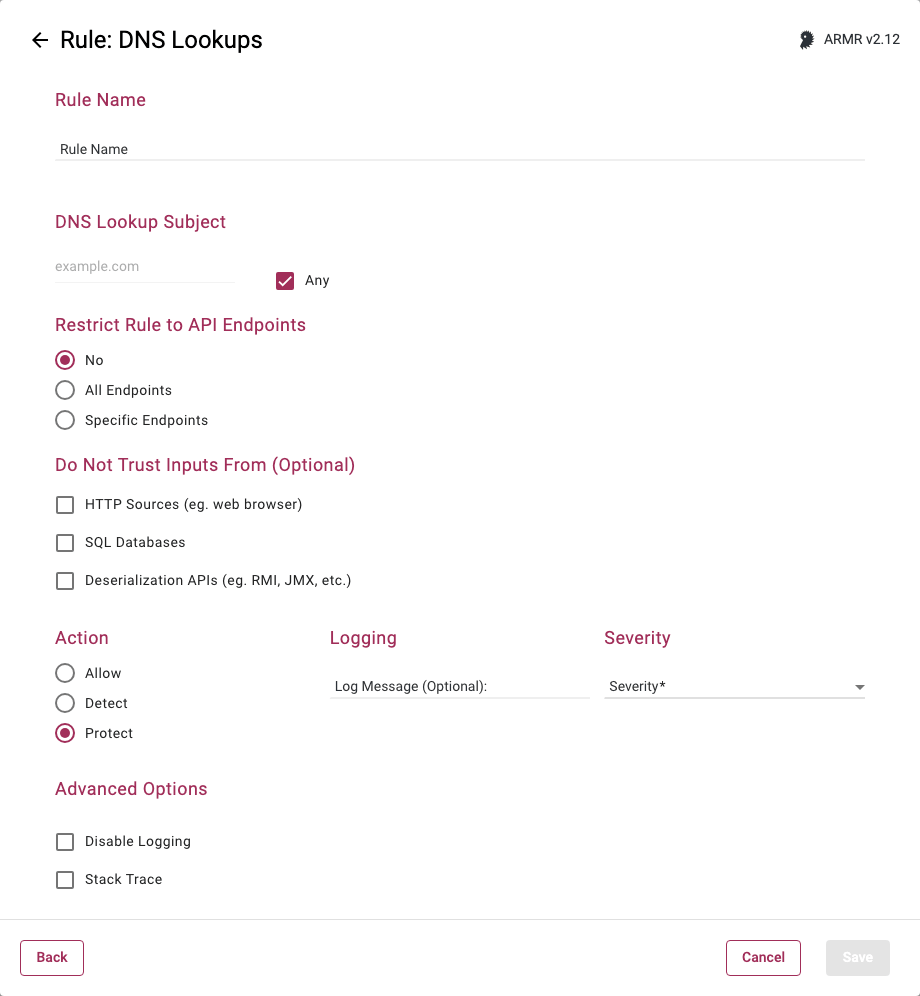
Rule Options
DNS Lookup Subject
Valid entries in this field are a hostname, or an IPv4 address. You may select a value of all or any by checking the Any checkbox next to the field.
Generally speaking this can be applied in two different ways: you can list a single domain or host that you wish to prevent from being looked up, or you can create two rules where the first DNS rule uses the Any check box option and the Protect action, and the second DNS Rule specifies an address to be whitelisted, and the action is set to Allow (Whitelist).
Any host or domain name entries here will parse on the end of the domain name. For example, if www.victim.com/index.html is entered here, this will automatically be parsed at the domain and only www.victim.com will be passed on to the RASP Java Agent.
Restrict Rule to API Endpoints
You can limit the rule to respond to API requests only.
- No - Do not restrict the rule response
- All Endpoints - Restrict the rule response to API requests only
- Specific Endpoints - Restrict the rule response to API requests on the specified endpoints
You can change the default value No but you can select only one of these options.
Do Not Trust Inputs From
You can choose the sources that the rule will treat as untrusted. This section is optional, you do not have to select any or you can select all of the sources listed:
- HTTP - Data received by the application from HTTP requests (e.g. from a web browser).
- SQL Databases - Data received by the application from a SQL database.
- Deserialization APIs - Data received by the application via deserialization APIs (e.g. RMI, JMX, java.io.ObjectInputStream, etc.)
Action
- Detect - The Agent will detect the lookup of listed address(es) and generate Security Event which and the event will be viewable on the Security Events page in the Portal, but the Agent will take no further action.
- Protect - In addition to the Detect actions, the RASP Java Agent will also actively prevent the lookup of the address(es) from succeeding.
- Allow - Acts as whitelist, will supersede the Protect action by whitelisting addresses to be excluded from Protect actions.
If multiple DNS rules are created, the Agent will not allow matching hostnames or wildcards to be specified between rules.