Sanitization
The ARMR Sanitization rule can be used to verify data entering the workflow of a server via a HTTP request. Such data is referred to here as a payload and could be in the form of a String, JSON, or XML. Each payload is then matched against known safe and unsafe patterns.
Overview
The unsafe patterns include common Cross-Site-Scripting, SQL Injection, and Path Traversal attacks. Any payload that matches an unsafe pattern will be marked for sanitization, which means that a payload has been found to be potentially malicious and an action will need to be taken. If the rule action is configured in protect mode, the payload will be prevented from being used by the system and a CEF event will be generated. Configuring the rule in detect mode will generate a CEF event and allow the workflow to continue uninterrupted. It is also possible that a payload may not cleanly match with any of the safe or unsafe patterns. Such payloads are labelled as undetermined values. For such cases, the rule can be configured to automatically mark all undetermined values as being safe or unsafe. Safe undetermined values will be logged, where unsafe undetermined values will be handled by the action.
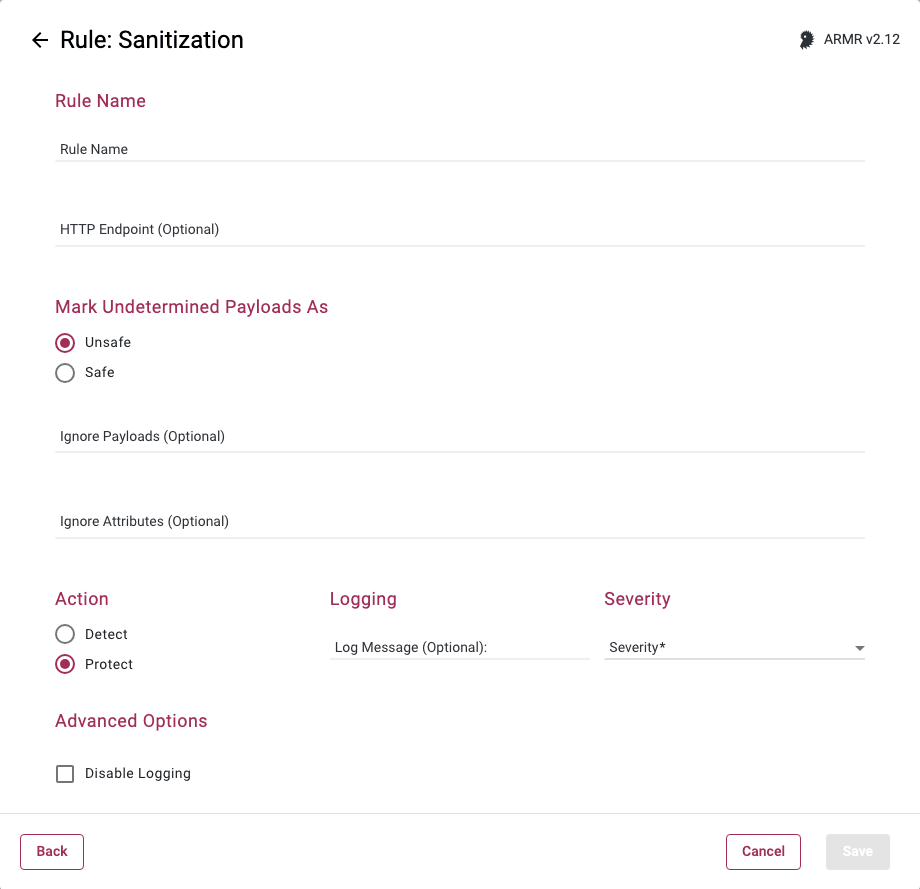
Rule Options
HTTP Endpoint (Relative URI)
Here you can enter a list of relative URIs to be protected, monitored, or whitelisted. A relative URI includes only the path portion of the URL, not the domain. For example, if the website address is http://www.victim.com/home/test.html, then /home/test.html is the relative URI (or HTTP endpoint).
The path within the relative URI must be absolute and begin with a leading /. In the above example /home/test.html is valid, while home/text.html is not. In addition relative paths may not contain .. or other similar characters denoting path shortcuts. For example, /home/test/user/test.html is valid, but ../test/user/test.html is not.
Enter in a value in the field, and upon clicking the Add button, entering in a comma, or hitting enter, the value will be stored and shown as a chip below the input field. Copying and pasting of lists, separated by commas or carriage returns, is supported.
Mark Undetermined Payloads As
This configures how the rule shall handle undetermined payloads. Undetermined payloads configured as Safe will be logged, and Unsafe payloads will be handled by the Action.
Ignore payloads
This field is optional.
When a String value comes into the system that is actually safe, but the rule has flagged it as being unsafe, this allows the rule to ignore that particular value. In other words, string values that match patterns defined here will be marked as Safe and override the rule's pattern matching.
Ignore attributes
This field is optional.
This is the same idea as the ignore payload, but broader. An attribute is a named variable where a payload is assigned to. Attributes include class fields, map keys, or URL query parameters. In all cases, a payload is assigned to an attribute that has a deterministic name. Attributes are reference throughout a system by their name to retrieve the value assigned to them. If it can be determined that an attribute's value cannot be abused, then this option allows you to ignore the values assigned to an attribute with a particular name.
Actions
In protect mode, the payload will be prevented from being used by the system and generate Security Event.
In detect mode, the event will generate a CEF event and allow the workflow to continue uninterrupted.
If multiple Sanitization rules are created, the Agent will not allow matching HTTP Endpoints to be specified between rules.