Path Traversal
Path Traversal is when an attacker uses some mechanism (such as unsanitized user input to a web form) in order to access directories outside of those that the attacker is supposed to be restricted from.
Overview
An example of a Path Traversal is when a user that is otherwise restricted to /usr/public/sandbox might construct a user input that allows them to access files in a directory such as ../../local/bin/vulnerableScript.sh. This is a relative path attack and essentially backs the attacker out of the supposedly restricted /public/sandbox, and allows them to access files in /local/bin, all under /usr. There are 2 types of these attacks, and they are described below in the Wizard Parameters's Traversal type section.
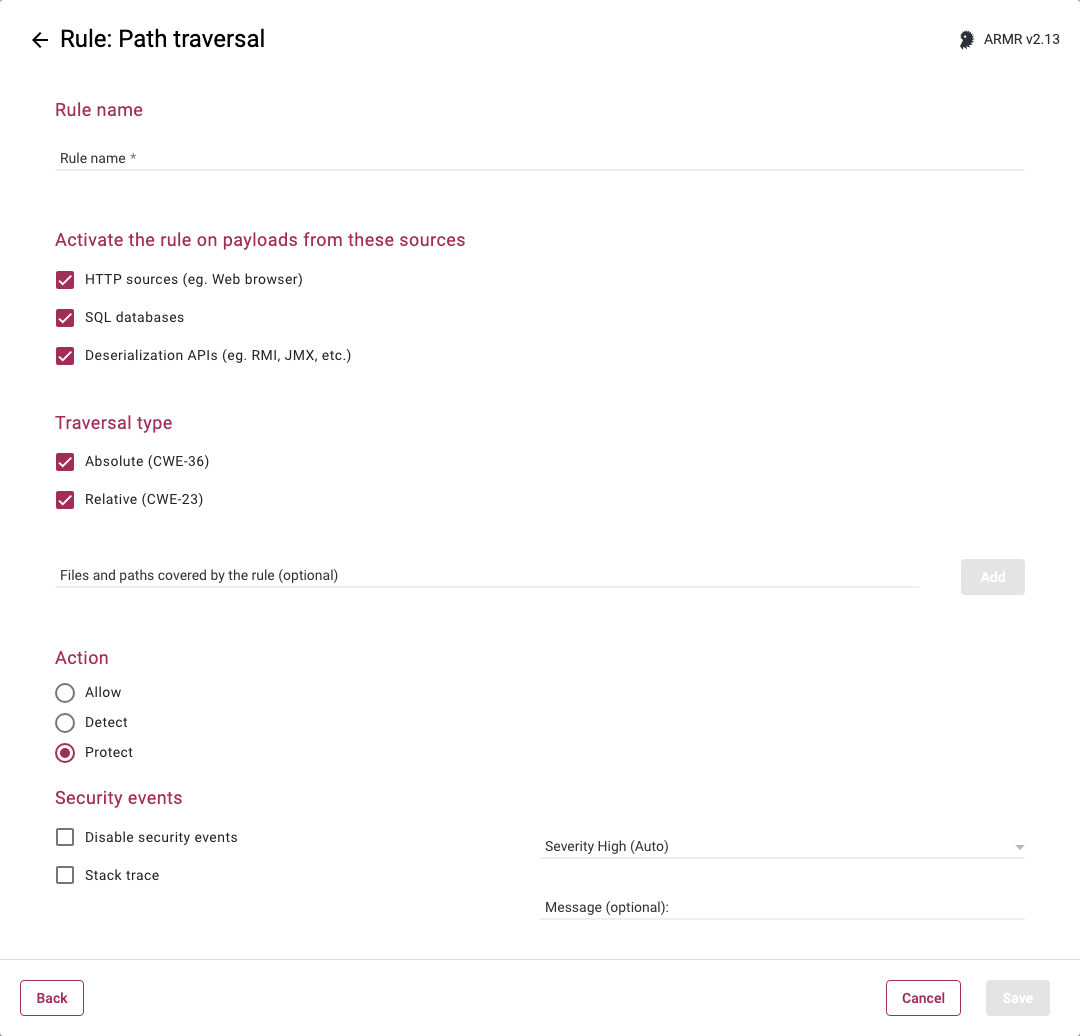
Rule Options
Activate the rule on payloads from these sources
These are the sources that the Actions section will act upon when a traversal is detected.
- HTTP sources (eg. Web browser) - The untrusted data is data received by the application from HTTP requests (e.g. from a web browser).
- SQL databases - The untrusted data is data received by the application from a database.
- Deserialization APIs (eg. RMI, JMX, etc.) - The untrusted data is data received by the application via deserialization APIs (e.g. RMI, JMX, java.io.ObjectInputStream, etc.)
You may select one or many of these, but at least one selection is required. By default, all three sources are selected.
Traversal type
- Absolute (CWE-36) - in the case the absolute path can be given. For example, if the application utilized the directory
/usr/public/sandboxand the attacker wanted to get to thescript.shfile in/usr/local/bin, the attacker would provide a path of/usr/local/bin/script.sh - Relative (CWE-23) - the attacker attempts to navigate the directory structure using the current directory as a starting point such that all paths are relevant to the on that the Waratek protected application lives in. For example, if the application utilized the directory
/usr/public/sandboxand the attacker wanted to get to the script.sh file in /usr/local/bin, the attacker would provide a path of../../local/bin/script.sh
Files and paths covered by the rule (optional)
This field is available with ARMR v2.13 and later.
Restricts the rule to path traversal attempts that target these files and directories. Leave empty to apply the rule to the entire filesystem.
Enter a path in the field, and upon clicking the Add button or pressing the Return/Enter key, the path is added to the list of paths below the field. Wildcards (*) are supported anywhere in the file name or path:
- Only one wildcard character can be used with each path.
- The wildcard will only wildcard a single directory.
- The wildcard can be used to specify all files with a specific prefix.
- The wildcard character specified on its own represents all files and directories on the filesystem.
Action
- Allow - Available with ARMR v2.13 and later. Acts as whitelist, will supersede the Protect action.
- Detect - The Agent will detect the lookup of listed address(es) and generate Security Event which will be viewable on the Security Events page in the Portal, but the Agent will take no further action
- Protect - In addition to the Detect actions, the RASP Java Agent will also actively prevent the attack from succeeding.
Only a single Path Traversal rule is allowed per agent. This rule can specify protection for relative or absolute path traversal attacks, or both.