Process Forking
A Process Forking rule prevents a protected application from executing any process that it should not have access to or be allowed to execute.
Overview
This rule could prevent an application from executing telnet, adduser, or rm commands on the system on which it resides. This protection isn't specific to a CWE or other defined or limited attack. The method of attack that causes the protected application to attempt to execute a specific command is irrelevant to this rule. This rule only looks at and potentially protects against the end result of any such attack.
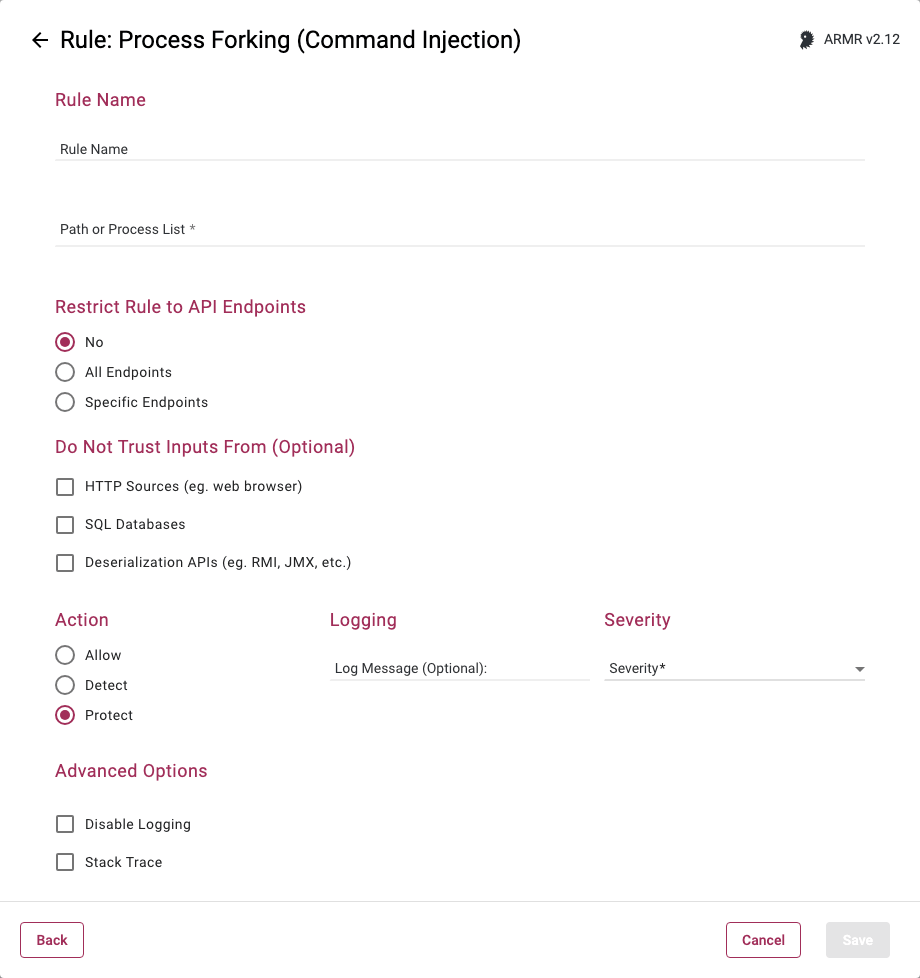
Rule Options
Path or Process List
Here you can type in a path(s) or specific process(es) that the rule will apply to. Generally speaking this can be applied in 2 different ways:
- You can list a number of paths and/or processes (no path required for processes) that they wish to prevent from being executed via the protect action, or
- You can create a pair of rules where the first Process rule uses a path to Protect (e.g. /usr/bin/*), and the second Process Rule allows or whitelists specific processes (via the Allow/Whitelist action) contained within that path, such as
/usr/bin/allowMe.sh.
This way if there are 100 processes in that directory and you wish to protect 98 of them, you do not have to create 98 rules or an unwieldy rule listing 98 processes. You can instead create 1 rule to protect against all of the processes within, and create another rule to carve out the 2 that you want to allow to be executed.
In essence, the Allow/Whitelist option is allowing us to say “Protect all of these Processes” (wildcard protect rule) followed by “Except these” (allow rule) instead of saying “Protect this process” (standard rule, 98 times).
You can type paths or processes into the text field and upon typing a comma or hitting the Return/Enter key the entries will be accepted and converted to a pill object which can then be removed from the list by clicking on the pill's cross symbol (x).
Restrict Rule to API Endpoints
You can limit the rule to respond to API requests only.
- No - Do not restrict the rule response
- All Endpoints - Restrict the rule response to API requests only
- Specific Endpoints - Restrict the rule response to API requests on the specified endpoints
You can change the default value No but you can select only one of these options.
Do Not Trust Inputs From
Protection can be, optionally, limited to commands that contain untrusted input. If no inputs are selected, protection is applicable to all process forking, no matter how this process was obtained by the Application.
Sources that the rule will treat as untrusted are:
- HTTP - Data received by the application from HTTP requests (e.g. from a web browser).
- SQL Databases - Data received by the application from a SQL database.
- Java Deserialization APIs - Data received by the application via deserialization APIs (e.g. RMI, JMX, Java Object Deserialization, etc.)
It is not possible to create an Allow rule which would only be applicable in the context of processing API requests. Restricting the rule to specific endpoints will remove the Allow action option.
Selecting input(s) not to trust will also remove the Allow action option. The Allow action can only be specified for the path or process list, and it cannot be limited to any single trusted input source.
See the API Protect section of the ARMR documentation for further details.
Relationship to Deserialization of Untrusted Data
It is important to distinguish between selecting the Java Deserialization API as an untrusted input source, above, and configuring a Deserialization of Untrusted Data rule. A Process Forking rule with a Java Deserialization input is a global protection against the execution of operating-system commands, but limited to those which contain text (i.e. parameters or file name) obtained from serialized Java Objects.
Meanwhile, a Deserialization of Untrusted Data rule guards against Process Forking initialized by malicious serialized Java Objects, during its deserialization.
Action
- Detect - Detect - The Agent will detect the execution of listed process(es) and generate Security Event which will be viewable on the Security Events page in the Portal, but the Agent will take no further action.
- Protect - In addition to the Detect actions, the RASP Java Agent will also actively prevent the execution of the process(es) or anything within the protected paths from succeeding.
- Allow - Acts as whitelist, will supersede the Protect action by whitelisting processes to be excluded from Protect actions.