Socket Connect
The purpose of the Socket rules is to monitor and control (allow or restrict) network connections for the Waratek protected application.
Overview
Network connections can be controlled by restricting, monitoring, or allowing connections to or from specific IP addresses, ports, or paired combinations.
Network-based applications that are Waratek-protected will need to communicate with remote clients and servers utilizing TCP/IP addresses and/or ports This is accomplished either by accepting incoming connections (Accept Rule), establishing outgoing connections (Connect Rule), or Binding to local ports in either a server or client capacity.
For example, the rule might be used to deny incoming connections to the Waratek protected application from specific IP addresses, or to prevent the Waratek protected application from even reserving and listening on a network port, or to prevent the application from connecting to specific ports on any machine - for example you might want to restrict a DNS server from communicating on any ports other than 22 (ssh, for admin purposes), 53 (default DNS port for TCP or UDP), or 853 if running DNS over TLS.
The Connect Rule applies to Waratek protected applications acting as a client and attempting to establish an outgoing connection to a remote service. A connect rule will either allow or deny the protected application from attempting to contact the remote service. The IP Address and Port parameters designate the address of the remote clients to which the Waratek protected application is attempting to establish a connection.
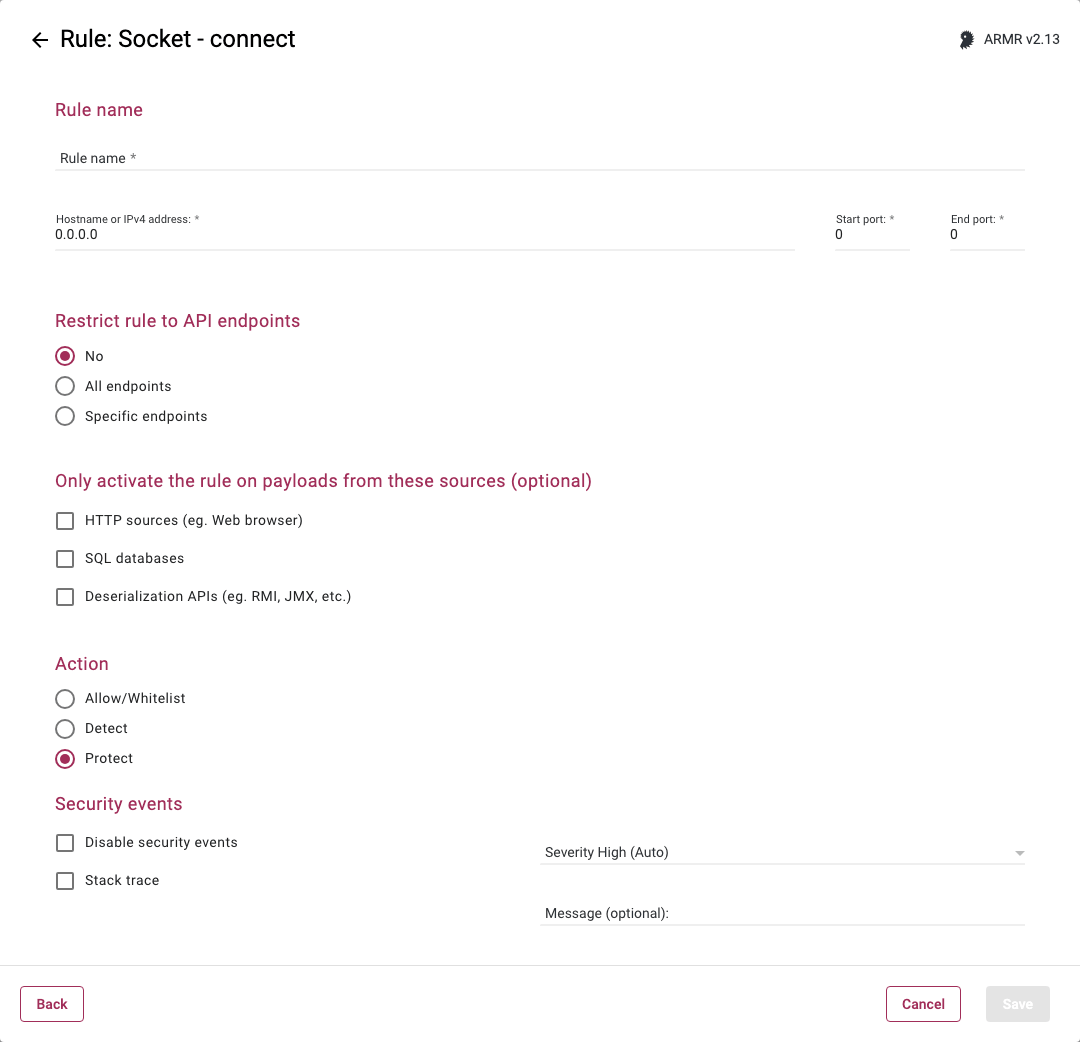
Rule Options
Hostname or IPv4 address
In this field, a single hostname or IPv4 address can be specified
-
Host Names can be specified (e.g.
www.google.com) -
An IP Address value of
0.0.0.0indicates a wildcard value of Any IP address. -
IP addresses can be specified in either of the following two notations:
-
Dot-Decimal (e.g.
1.2.3.4) -
CIDR (e.g.
1.2.3.4/22)- CIDR notation for IP address ranges is supported on ARMR/2.10 and above. Valid CIDR notation format is an IPv4 IP addresss not containing any wildcard characters followed by
/<bit mask>, where<bit mask>is an integer in the range 1 to 32
- CIDR notation for IP address ranges is supported on ARMR/2.10 and above. Valid CIDR notation format is an IPv4 IP addresss not containing any wildcard characters followed by
-
Start port / End port
In these two fields, a port or port range can be specified
- A Port value of
0indicates a wildcard value of any port. - For a single port, both fields should have the same single port number. If you enter a port number in either the start or end ports and the other field is blank, then the number entered will be mirrored in the other port.
- The Start port must be =< the End port.
Rule Specificity
More specific rules (e.g., matching exact IP and port) take precedence over less specific (wildcard) rules. If multiple rules match, the most specific rule with the highest-priority action is applied.
Restrict rule to API endpoints
You can limit the rule to respond to API requests only.
- No - Do not restrict the rule response
- All endpoints - Restrict the rule response to API requests only
- Specific endpoints - Restrict the rule response to API requests on the specified endpoints
You can change the default value No, but you can select only one of these options.
Only activate the rule on payloads from these sources (optional)
Protection can be, optionally, limited to connections whose payloads come from specific sources. If no sources are selected, protection is applicable to all network connections, no matter how this network connection was obtained by the Application.
The sources on which the rule can be activated are:
HTTP sources (eg. Web browser) - Data received by the application from HTTP requests.
SQL databases - Data received by the application from a SQL database.
Deserialization APIs (eg. RMI, JMX, etc.) - Data received by the application via deserialization APIs (e.g. RMI, JMX, Java Object Deserialization, etc.)
It is not possible to create an Allow rule which would only be applicable in the context of processing API requests. Restricting the rule to specific endpoints will remove the Allow action option.
Selecting any of the payload sources will also remove the Allow/Whitelist action option. The Allow/Whitelist action can only be specified for the Hostname or IPv4 address, and it cannot be limited to any single payload source.
See the API Protect section of the ARMR documentation for further details.
Action
- Detect - The Agent will detect the attack and generate Security Event which will be viewable on the Security Events page in the Portal, but the Agent will take no further action.
- Protect - In addition to the Detect actions, the RASP Java Agent will also block socket operation.
- Allow/Whitelist - Acts as whitelist, will supersede the Protect action by whitelisting addresses to be excluded from Protect actions.
Action Priority
When multiple ARMR rules match a socket operation, the action taken is determined by the following priority order:
- Allow has the highest priority. If any matching rule has the Allow action, the operation is allowed.
- Protect takes precedence over Detect. If both Protect and Detect rules match, the Protect action is enforced.
- Detect is the lowest priority. It is only effective if there are no matching Allow or Protect rules.