SQL Injection
SQL injection attacks are a type of injection, in which malicious SQL commands are injected into otherwise benign and trusted websites.
Overview
SQL injection attacks occur when an attacker uses SQL code (queries) in order to manipulate the back-end database to display or return information that was never intended to be returned to users.
To accomplish this, the attacker looks for a web application that does not sanitize its form inputs properly and filter out SQL commands. This way an attacker can send the backend SQL commands and force the site to do a number of things. For example the attacker can get the database to display a list of all of the credit card or social security numbers in the system. An attacker can then edit the information in the database, or even delete parts or the entire database. Most often this can be done by typing in SQL code into a webform on an insecure page and clicking the Submit button.
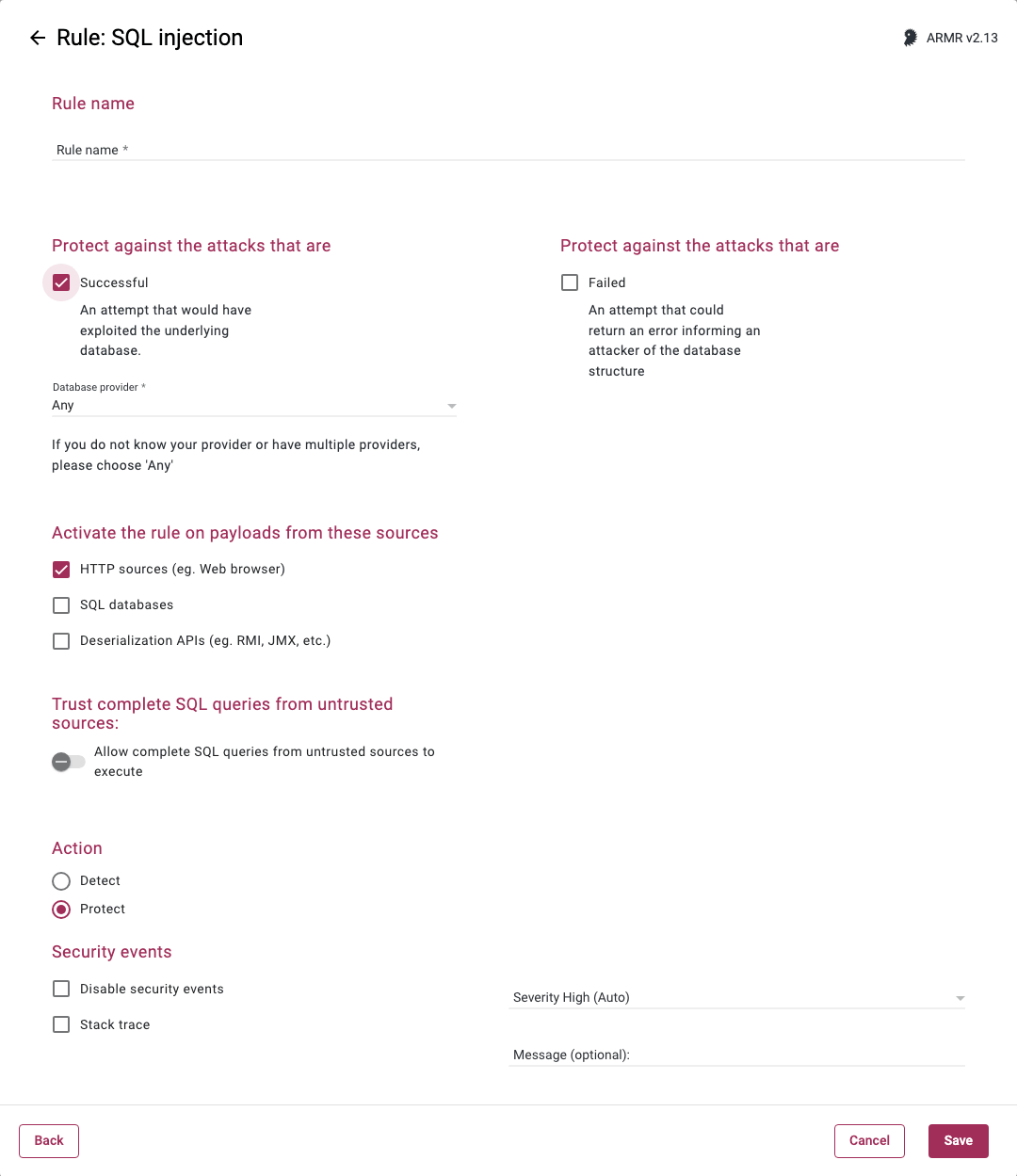
Rule Options
Protect against the attacks that are
Selecting one or both checkboxes will protect against or detect, and log any attempted SQL injection attacks. At least one must be selected:
- Successful - The rule will trigger upon detecting a valid SQL Injection that would have resulted in exploiting the underlying database.
- Failed - The rule will trigger upon detecting an invalid SQL Injection that could return an error informing an attacker of the database structure.
Database provider
When the Successful checkbox is selected, you can select the provider that matches the backend database that you wish to protect. Different selections have different options:
- Any, DB2, PostgreSQL, and Oracle all have no additional options
- Sybase and MS SQL both allow the optional selection of
Quoted-identifiers - MySQL and MariaDB allow for the options of
Ansi-quotesandNo-backslash-escapes
If you do not know your provider or have multiple providers it is best to choose the default option: Any.
Activate the rule on payloads from these sources
When the Successful checkbox is selected, you can choose the sources of the payloads on which the rule will be activated.
- HTTP sources (eg. Web browser) - Data received by the application from HTTP requests.
- SQL databases - Data received by the application from a SQL database.
- Deserialization APIs (eg. RMI, JMX, etc.) - Data received by the application via deserialization APIs (e.g. RMI, JMX, java.io.ObjectInputStream, etc.)
You may select one or many of these, but at least one selection is required. The default value is HTTP sources (eg. Web browser).
Permitted databases (optional)
When the SQL databases payload source is selected, you can add the hostnames, FQDNs, or IP addresses of the databases that this rule should allow. Leave it blank to permit any database.
Trust complete SQL queries from untrusted sources
When the Successful checkbox is selected, you will have the option to allow complete SQL queries from untrusted sources to execute, which means that the rule will not trigger in the case where the entire SQL query (and not just part of it) has come from any of sources selected in the Activate the rule on payloads from these sources panel.
Action
- Detect - The Agent will detect the attack and generate Security Event which will be viewable on the Security Events page in the Portal, but the Agent will take no further action.
- Protect - In addition to the Detect actions, the RASP Java Agent will also actively prevent the attack from succeeding.
If Protect is selected, you will have the option to select the Protect override option. When this toggle is turned on, an attacker will receive a HTTP 400 error. If the toggle is turned off (the default position), then the attacker will be disconnected.
Resources
More information on SQL Injection can be found at:
- the CWE's community-developed website
- the OWASP Foundation's website